
With no signs of slowing down, Zepto, an Indian Q-commerce startup, has become a go-to grocery delivery app for households across India.
Aadit Palicha and Kaivalya Vohra founded this Q-commerce company in 2021. Though Zepto is headquartered in Mumbai, it has over 350 dark stores in 10 major cities and aims to grow that number significantly.
With a valuation of $5 billion, this young grocery delivery startup is now competing against giants like Amazon, Blinkit, and BigBasket.
The cost to build an app like Zepto ranges from $10,000–$50,000 for a basic version to over $150,000 for a full-scale platform — depending on features, tech stack, team location, and whether you build from scratch or use a ready-made solution.
Here, we’ll discuss what it takes to build an app exactly like Zepto, the essential features of a grocery delivery app, Zepto’s business model, and the costs involved.
So, let’s begin.
Why is Zepto so popular?
Very similar to Blinkit, Zepto is an on-demand, quick-service mobile delivery app that delivers everyday home essentials and more at the tap of a button.
The name of the brand Zepto derives from the unit of measurement called the zeptosecond. A zeptosecond is equal to one trillionth of a billionth of a second, truly reflecting the brand’s biggest USP—-quick deliveries.
Along with the promise of a 10-minute delivery, Zepto also offers a range of products on its app, including fruits, vegetables, dairy products, snacks, personal care products, home essentials, and more.
According to Statista, the worldwide online grocery industry is worth $ 50.28 billion and is expected to grow at a CAGR of 26.8% from 2023 to 2030. Zepto has clearly carved its space in this growing market of on-demand grocery delivery.
By maximizing user convenience, Zepto and apps like it are truly transforming the way we shop our groceries.
How to Build an App like Zepto
Impressed with Zepto and want to build an app like Zepto? Here’s everything you need to know:
Aside from strategic dark store acquisitions, Zepto has also significantly invested in its mobile ordering application. From creating a seamless app, and adding advanced features to providing timely support—Zepto does it and all.
So if you too want to build an app like Zepto, you’ll need to focus on creating a user-friendly and highly responsive mobile app.
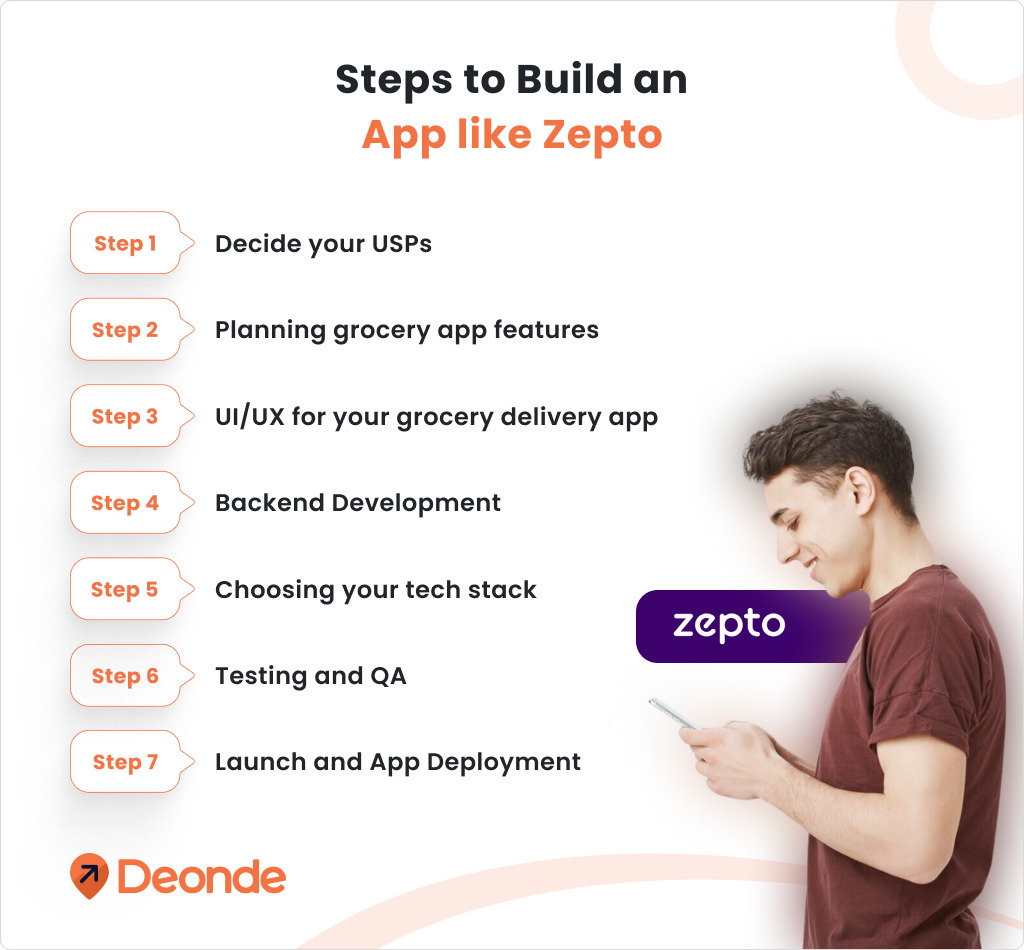
Step 1: Decide your USPs
The on-demand grocery delivery app market is highly competitive. To stand out, you need to decide your brand values and USPs and communicate them effectively. Zepto’s 10-minute delivery promise is a perfect example of how to use your USPs to target consumers.
Step 2: Planning grocery app features
Develop an on-demand grocery delivery app with a full range of advanced features and modules. Make these features accessible and easy to use.
To get you started, here’s a list of some of the top grocery delivery app features that you simply cannot afford to miss:
Hassle-free Registration & Sign-in
Enable quick sign-ups with easy and user-friendly registration processes. Allow users to create their profiles using social media sign-ins.
Advanced sort & search options
Improve the grocery app user’s experience by making product search more efficient with filters and a search bar that works across the entire platform. Have a category listing to make online shopping easier for the app users.
Payment Gateways
Offer multiple payment options like debit cards, credit cards, UPI, QR, and COD and facilitate secure, one-tap transactions on the app.
Real-time Order & Delivery Tracking
Enable users to check on their orders in real-time through GPS tracking and real-time updates. The order confirmation notification typically includes an order ID, order summary, and estimated delivery timings. It also includes a live-tracking segment where users can see the movement of delivery drivers in real-time.
User Dashboard
The dashboard lets users quickly check their previous orders and repeat them exactly as they were. The user dashboard also allows them to check out the delivered products and pending orders.
Recommended Products
Accelerate users’ shopping experience and create opportunities to upsell products with the recommended product functionality.
Wishlist & Add-to-Cart
Enable users to add their selected groceries to a virtual cart. Users can also edit and build a wishlist of items they wish to purchase. Also, add a notification option for out-of-stock items—so users know when they are refilled and can continue shopping.
Order Customization
Customers should have the freedom to browse seamlessly and add products to the cart before checkout. Also, include functionality to adjust quantities of ordered products for maximum convenience.
Push Notifications
Notify your app users about their order and delivery updates using push notifications. YOu can also leverage push notifications to promote offers and engage dormant users.
Refund Policy
Instill trust by setting up a transparent and fair refund policy. Train customer service reps to escalate and resolve customer queries promptly. You can also integrate customer servicing AI tools to heighten customer satisfaction.
Ratings and Reviews
Giving customers tools to voice their concerns regarding the quality and delivery of ordered groceries.
Inventory Management
Track inventory and optimize the supply and packaging of grocery items. An inventory management module will help dark store owners mitigate losses due to inventory shortages. Track average daily orders and leverage data insights for efficient inventory management.
In-app Communication Channels
Facilitate conversations through in-app chatting or voice calls. This will reduce the need for you to follow up on delivery drivers or customers.
Step 3: UI/UX for your grocery delivery app
Designing the user interface for your on-demand grocery delivery app is probably the most important part of the process. Your app should be neat, easy to use, and should reflect brand values.
This process will involve multiple mock-ups, wireframes, and design templates. Follow an iterative feedback model to fast-track designs.
To start with, keep your app design simple and easy to navigate. Intentionally place CTA and navigation buttons within the line of sight. Also, make sure your design is responsive and can adapt to all screens, including mobile phones, tablets, and laptops. Lastly, personalize your app with the brand logo, taglines, and brand colors.
Step 4: Backend Development
Your app’s backend will handle all the information storage and processing. Hence, it’s important to secure all backend processes and encrypt data to prevent hacking or data leaks. Depend on reliable third-party integrations to facilitate operations like ordering, payment processing, and customer information management.
Also, make sure your backend process can handle more workload as your business grows. Make it flexible and agile—so when the time comes, you can scale seamlessly.
Step 5: Choosing your tech stack
For a compatible grocery app that works well with all operating systems, choose frameworks like React Native or Flutter for cross-platform development. For Backend Development, try using a robust interface like Node.js, Django, or Ruby on Rails.
Use reliable databases like MySQL, PostgreSQL, or MongoDB for efficient data management. Lastly, take your app online with Cloud Services like AWS or Google Cloud. Inspect cloud space and user seats carefully before purchasing a cloud-service subscription.
Step 6: Testing and QA
Before launching your grocery delivery app, it is important to test it thoroughly for functionality, usability, and security. This involves conducting a range of tests, including unit testing, integration testing, and user acceptance testing.
Step 7: Launch and App Deployment
Now that we are done with testing and debugging—your app is flawless and ready to be deployed. However, you still need a plan to launch it. We recommend you start with a soft launch to test the waters. Observe how your grocery delivery app is doing in real-world scenarios.
Next, you need to optimize your app store optimization: Put relevant keywords and descriptions to your Play Store and App Store accounts. Affiliate marketing has become particularly effective for your grocery app marketing. Use it to spread the word. You can also offer exclusive discounts for first-time users and encourage them to invite friends and family for bonuses.
How much does it cost to create a Grocery Delivery App like Zepto?
The grocery delivery app development cost depends on several factors: features, target platform, geographical location of your development team, tech stack, and more.
Here is a realistic cost breakdown for 2026:
| Component | Basic / MVP | Full-Scale |
|---|---|---|
| UI/UX Design | $3,000–$8,000 | $15,000–$30,000 |
| Customer App (iOS + Android) | $10,000–$20,000 | $40,000–$80,000 |
| Admin Panel / Merchant Dashboard | $5,000–$12,000 | $25,000–$50,000 |
| Driver App | $4,000–$10,000 | $15,000–$35,000 |
| Backend & API Development | $8,000–$15,000 | $30,000–$80,000 |
| Real-Time Tracking | $3,000–$8,000 | $15,000–$40,000 |
| Dark Store Integration | $4,000–$8,000 | $20,000–$50,000 |
| QA Testing | $2,000–$5,000 | $8,000–$20,000 |
| Total Estimate | $10,000–$50,000 | $100,000–$300,000+ |
Note: Estimates based on offshore development teams (India/Eastern Europe at $20–$50/hr). US-based teams cost 2–3x more.
What pushes costs up:
- Native iOS and Android builds (vs cross-platform) cost 30–40% more
- AI-powered features like demand forecasting and route optimisation add $20,000–$60,000
- Multi-city dark store management adds significant backend complexity
- Post-launch maintenance typically runs 15–20% of your build cost annually
Is There a Faster Way to Launch a Zepto-Like App?
Yes. If you want all the advanced features of Zepto — the best tech infrastructure and a highly engaging app — without spending $100,000 or waiting 12 months, Deonde is the answer.
Deonde offers white-label grocery delivery solutions that are fully customisable and can be launched within 7 to 10 days — at just $49 per month.
Deonde’s grocery delivery suite includes everything you need:
- Customer ordering app (mobile + web)
- Merchant / dark store management panel
- Driver app with real-time GPS tracking
- Admin dashboard with analytics and payment settlement
- Built-in marketing tools — coupons, loyalty programmes, push notifications
| Approach | Cost | Time to Launch |
|---|---|---|
| Custom build (MVP) | $10,000–$50,000 | 6–12 months |
| Custom build (full-scale) | $100,000–$300,000+ | 12–18 months |
| Deonde SaaS platform | From $49/month | 7–10 days |
For startups testing market fit before committing large capital, a SaaS-first launch makes financial sense. Once you validate demand and reach steady order volume, you can decide whether to invest in proprietary tech.
At a Glance
- The cost to build an app like Zepto starts at $10,000–$50,000 for an MVP and exceeds $300,000 for a full-scale platform.
- Zepto’s business model is built on dark stores, the PPB formula (Pick, Pack, Bag), and four revenue streams: commissions, delivery fees, subscriptions, and sponsored ads.
- The 10-minute delivery promise is not just marketing — it is a technology and operations strategy backed by AI-powered route optimisation.
- Team location is the biggest cost driver. Offshore teams cost 60–70% less than US-based developers.
- A full custom Zepto clone takes 12–18 months to build. Deonde’s white-label solution launches in 7–10 days at $49/month.
- Post-launch maintenance, server costs, and user acquisition add significant ongoing expenses — factor these into your budget from day one.
- India’s Q-commerce sector grew 77% year-on-year in 2023, per RedSeer Consulting. The market opportunity for new entrants is still wide open.
Conclusion
Zepto’s rapid rise shows the power of a focused quick-commerce business model. By combining technology, strategic dark store placement, and the PPB formula, Zepto has redefined what grocery delivery can look like.
If you are a startup or last-mile delivery entrepreneur who wants to replicate Zepto’s success — the path is clear. Building from scratch costs $10,000 to $300,000+ depending on your scope. It takes 6 to 18 months. And it requires a dedicated team across tech, design, QA, and support.
If that sounds like too much capital and time to commit upfront, Deonde is your answer. With Deonde’s white-label grocery delivery apps, you can launch your hyperlocal delivery business in 7 days at just $49/month.
Start your free trial now and enter the booming on-demand grocery market without the risk of a from-scratch build.
FAQs
1. What is Zepto?
Zepto is a Q-commerce, on-demand grocery delivery app that delivers household grocery items to customers within 10 minutes. It operates through a network of dark stores — small, non-public fulfilment warehouses — located within 3 km of target customers.
2. How Much Does It Cost to Build an App Like Zepto?
The cost to build an app like Zepto ranges from $10,000–$50,000 for a basic MVP to $100,000–$300,000+ for a full-scale platform with dark store integration, AI features, and multi-city support.
3. How Long Does It Take to Build an App Like Zepto?
Building a Zepto-like app from scratch takes 6–12 months for an MVP and up to 18 months for a full-scale platform. Startups using a white-label solution like Deonde can go live in 7–10 days.
4. What Features Does a Zepto-Like App Need?
A Zepto-like app needs: real-time GPS order tracking, smart product search, multiple payment gateways, inventory management, push notifications, a driver app with route optimisation, and a dark store management panel.
5. Why Invest in Grocery Delivery App Development?
The worldwide online grocery market is worth $50.28 billion and growing at 26.8% CAGR through 2030, per Grand View Research. Zepto’s unicorn status and $1.3 billion in funding prove that Q-commerce is a viable, high-growth market for new entrants.
6. What Are the Benefits of Online Grocery Delivery App Development?
For customers: convenience, time savings, and access to a wide product range. For businesses: a scalable revenue model, access to a large addressable market, multiple income streams (commissions, subscriptions, ads), and strong repeat purchase behaviour from loyal users.
7. Can I Build a Zepto-Like App Without a Development Team?
Yes. Platforms like Deonde provide a ready-built, white-label quick commerce infrastructure. You configure your branding, set up delivery zones, and go live — no coding required. This approach costs a fraction of custom development and launches in days.


