Restaurant Partner App —
Order Management, Menu & Earnings,
All on Mobile

Give every restaurant, store, or vendor a dedicated mobile app to accept orders, update menus, set availability, and track earnings — in real time. White-label, iOS & Android, under your brand. No training needed.

White-label under your brand iOS & Android Unlimited vendors Live in 3–7 days
300+
Businesses
10,000+
Vendors Using the App
24+
Countries
2M+
Orders Managed/Month

Trusted by 300+ brands worldwide

Chowman HungryJi Needy Baghdadi TalabNow PocketSaver Northern Eats Bunana Rapid Dinger
Why Every Platform Needs a Vendor App

Empower Every Partner. Scale Without Bottlenecks.

Without a dedicated partner app, every menu update, opening hours change, and payout question becomes a support ticket your team has to handle. Give each restaurant their own tool — and your platform runs itself.

Partners stay in control. You stay out of the way.

Orders Alert Partners Instantly

Push notifications the moment an order lands — partners accept, set a prep time, and start cooking from their phone. No calls, no delays.

Each Partner Controls Their Own Store

Menu items, prices, availability, opening hours — partners manage it all independently. Your admin team stops being the middleman for routine changes.

Scale to Hundreds of Vendors Easily

Because every partner is self-sufficient, adding the 50th restaurant takes the same effort as adding the 5th. Your platform scales, your support load doesn't.

Earnings Always Transparent

Partners see their own sales, order history, and payout breakdowns in real time — fewer support queries and stronger partner trust in your platform.

Partner App Features

Everything a Restaurant or Vendor Needs to Run Their Store on Your Platform

Deonde's partner app puts restaurant owners and store operators in full control of their operations — from the moment an order arrives to when their payout is settled. No desktop. No calls to your admin team. Just a phone.

Real-Time Order Alerts

Instant push notification with audio alert the moment a customer places an order. Accept with prep time or reject with a reason — all in one tap.

Menu Management on Mobile

Add items, edit prices, update descriptions, upload photos, create categories, and mark items as out-of-stock — instantly, from the phone, without admin support.

Store Hours & Availability Control

Set regular operating hours, holiday closures, and toggle the store open or closed instantly. Customers see real-time availability on your ordering platform.

Revenue & Payout Dashboard

Partners view daily, weekly, and monthly order totals, revenue earned, commission deducted, and pending payout balance — with full transaction history.

Live Driver Tracking

Restaurant partners see when the driver is on the way for pickup, current location, and ETA — so the kitchen can time order completion to driver arrival.

Order Printing Support

Auto-print order tickets to a Bluetooth or Wi-Fi thermal printer the moment an order is accepted — routing kitchen staff without manual relay.

In-App Chat

Partners communicate with customers about special requests, missing items, or delays directly within the app — without exchanging personal phone numbers.

Ratings & Reviews

Partners see customer ratings and reviews for their store — helping them understand performance and act on feedback to improve order quality and ratings.

Multi-Location Management

Restaurant chains with multiple branches manage all locations from a single partner app login — switching between outlets, viewing per-branch orders and revenue.

Item Add-Ons & Customizations

Partners configure item-level add-ons, modifiers, size options, and extras — giving customers a rich, customizable ordering experience straight from the menu.

Order History & Invoices

Partners access their complete order history, filter by date or status, and download invoices — reducing back-and-forth with your admin team on settlement queries.

Notification Preferences

Partners configure notification preferences — audio alerts volume, vibration, and specific alerts for new orders, cancellations, and customer messages.

Real-Time Order Management

Every Order, Every Status, Every Customer Note — Managed in Seconds From a Phone

Restaurant partners shouldn't need a laptop to run their store. Deonde's partner app puts the full order management workflow on mobile — from the moment a customer places an order to when it's ready for pickup. Partners accept orders, set prep times, update status, and communicate with customers without leaving the kitchen. No missed orders. No phone calls to the admin team.
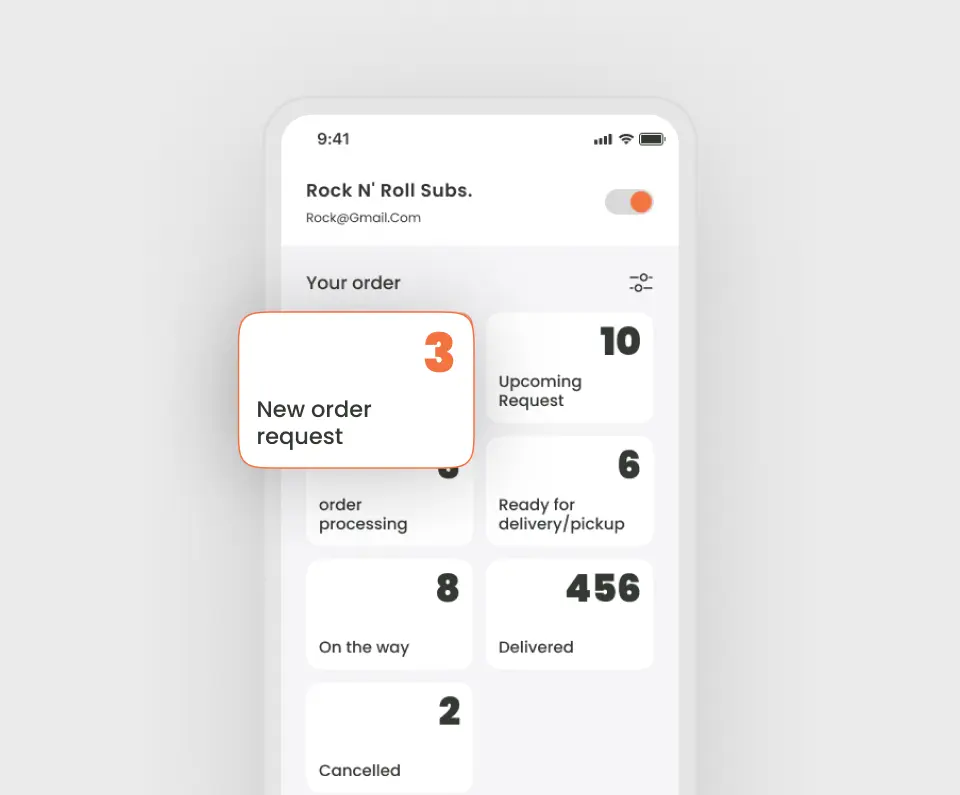
  • Instant audio alert and push notification for every new incoming order
  • Accept order with a single tap — set custom preparation time in minutes
  • View full order details: items, customizations, customer notes, delivery address
  • Update order status: Accepted → Preparing → Ready for Pickup
  • Auto-print order ticket to kitchen thermal printer on acceptance
  • Configurable auto-accept timeout — orders auto-confirm if partner doesn't respond
Restaurant partner app showing real-time order management on mobile by Deonde
Menu management from mobile in Deonde restaurant partner app
Mobile Menu Management

One of the most frequent pain points in running a food delivery marketplace is menu changes — restaurants calling to update prices, mark items unavailable, add specials, or change photos. With Deonde's partner app, every restaurant and vendor self-manages their menu in real time. Changes reflect immediately on your customer app and ordering website. Your admin team handles strategy, not data entry.
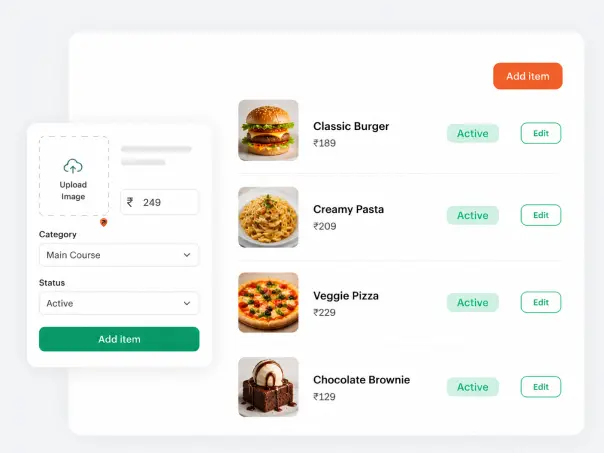
  • Add new items with photos, descriptions, prices, and categories
  • Mark items as temporarily unavailable — customers see it immediately
  • Update prices, portion sizes, and descriptions on the fly
  • Build item customizations: add-ons, modifiers, size variants, and extras
  • Create and schedule daily specials or limited-time offers
  • Reorder menu categories to highlight best-selling items
Get Started Free
Earnings & Payout Transparency

Restaurant Partners See Every Rupee & Dollar They've Earned — Right in the App

Revenue disputes and payout queries are one of the biggest operational drains for marketplace operators. When partners can't see their own earnings, they escalate to you. Deonde eliminates this friction — every partner has a built-in revenue dashboard showing their real-time order totals, commission breakdowns, pending settlements, and complete payout history. Full transparency, fewer queries, happier partners.
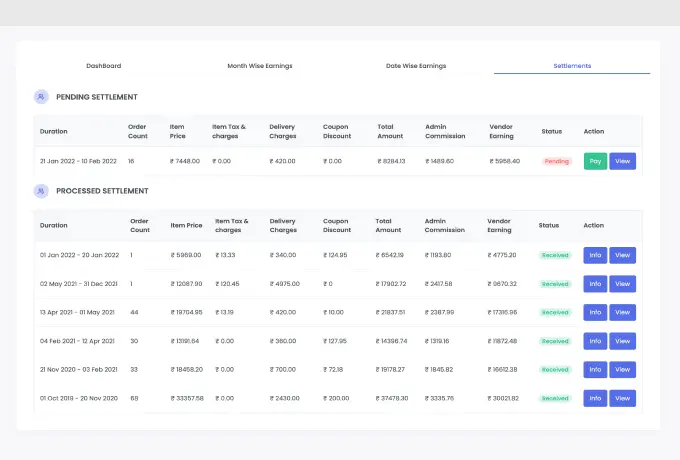
  • Daily, weekly, and monthly revenue summary with order count breakdown
  • Commission deduction visibility — partners see exactly what's being charged
  • Pending payout balance and settlement history with dates
  • Per-order earnings detail — view any order's revenue contribution
  • Downloadable transaction statements for partner accounting
  • Admin-controlled payout schedule — weekly, bi-weekly, or monthly settlements
Revenue and payout dashboard for restaurant partners in Deonde vendor app
Complete Platform

The Partner App Is One Piece of Your Complete Food Delivery Stack

The partner app connects seamlessly with every other component in Deonde's platform — customer ordering app, driver app, admin dashboard, and analytics — so your entire operation runs in sync.

Restaurant Partner App
Your branded iOS & Android app for every vendor — real-time orders, menu control, store availability, driver tracking, and earnings. All from a phone.
Super Admin Dashboard
You see everything — all vendors, all orders, all drivers, all revenue. Onboard partners, set commission rates, manage payouts, and monitor performance from one panel.
Customer Ordering App
Customers browse all partner menus on your branded app, place orders, and track delivery. Menu updates made in the partner app reflect in the customer app instantly.
Driver Delivery App
Drivers are dispatched to partner restaurants for pickup as orders are accepted. Partners track driver arrival in real time — reducing wait times and cold food complaints.
Online Ordering Website
Orders from your branded web store flow into the partner app in real time — the same alert, same workflow, same earnings tracking as the mobile ordering channel.
Analytics & Reporting
Per-vendor performance reports in the admin panel — top-selling items, order completion rate, average prep time, and revenue trends — so you know which partners are thriving.
Who It's Built For

The Partner App Works for Every Vendor Type on Your Platform

Whether your partners are fine-dining restaurants, home cooks, grocery stores, or pharmacies — every vendor on your platform gets the same powerful, easy-to-use partner app experience.

Restaurants & Cafes
Cloud & Ghost Kitchens
Grocery & Convenience Stores
Pharmacies & Medical Stores
Restaurant Chains & Franchises
Bakeries & Dessert Shops
Tiffin & Home Kitchen Vendors
Meat & Seafood Stores
Flower & Gift Shops
Multi-Category Marketplaces
How It Works

Onboard a Restaurant Partner and Get Them Taking Orders in 3 Steps

Adding vendors to your Deonde platform takes minutes. Each partner gets their own app login — ready to use immediately, no training session required.

Add the Partner From Your Admin Panel

Create a new vendor profile from your super admin dashboard. Enter the restaurant name, address, category, and commission rate. Set their payout schedule and delivery zone coverage in minutes.

Partner Downloads the App & Sets Up Their Menu

Send the partner their login credentials. They download the app, log in, build their menu — adding items, photos, prices, and customizations — and go live in their own time. No technical knowledge needed.

They Start Receiving & Managing Orders Live

The partner's store goes live on your platform. Customers start ordering, the partner gets instant alerts, accepts orders, tracks drivers, and watches their earnings grow — all without contacting your team.

Customer Stories

Real Stories from
Founders Who Scaled with Deonde

See what our customers say about transforming their delivery business

"Deonde's team was fantastic in creating our own ordering app. It's made a real difference in how we operate, and our customers are finding it so convenient. Highly recommend their service!"
Debaditya Chaudhury
Founder, Chowman
Read Chowman Case Study →
"Starting our own delivery app felt overwhelming before Deonde. But they made it incredibly simple. We launched in less than a week, and our sales have grown significantly since then."
Doni Riba
CEO, HungryJi
Read HungryJi Case Study →
"Deonde has completely transformed how we handle orders. The admin panel gives us full control, and our customers love the smooth ordering experience. Best investment we've made."
Tatenda Jakarasi
Founder, Munch Zimbabwe
Read Munch Zimbabwe Case Study →
Why Deonde

Built for Business Growth, Not Just Ordering

Everything you need to run a world-class delivery operation, included from day one

Easiest Usability

Intuitive dashboards your team can master in hours. No technical expertise required to get started.

Enterprise-Grade Security

Bank-level encryption, GDPR compliance, and 99.99% uptime SLA. Your data and your customers' data stays safe.

Better ROI

Zero commissions means every order goes directly to you. Most businesses recover their investment within the first month.

Constant Support

Dedicated onboarding team and 24/7 technical support. We're with you from setup to scale.

Periodic Updates

New features shipped every month. No extra cost, no downtime. Your platform evolves with market demands.

Access Anywhere

Manage your business from any device, anywhere. Full-featured web dashboard plus native mobile apps.

FAQ

Frequently Asked Questions

Everything you need to know about Deonde's restaurant partner app

A restaurant partner app (also called a vendor app or merchant app) is a mobile application used by restaurant owners and store operators to manage incoming orders, update their menu, set store availability, and track earnings — all from their smartphone. In a multi-vendor food delivery marketplace, every partner on your platform gets their own dedicated app login to manage their operations independently without needing to call or message your admin team.
Yes. Deonde's restaurant partner app is available for both iOS (App Store) and Android (Google Play). The app is white-label — it carries your platform's brand name and identity, not Deonde's. All restaurant and store partners on your marketplace download one app to manage their store on your platform.
Yes. Restaurant and store partners can add new items, edit prices and descriptions, upload item photos, create categories, set item add-ons and customization options, and instantly mark items as out of stock — all from the partner app without needing desktop access or assistance from your admin team. Changes go live on the customer app and ordering website immediately.
When a customer places an order, the restaurant partner receives an instant push notification and audio alert on their app. They can accept the order and set a preparation time, or reject it with a reason. Once accepted, the order appears in their active orders queue with full item details, customer notes, and delivery instructions. They update the order status — Accepted → Preparing → Ready for Pickup — as they work through the order.
Yes. The partner app includes a revenue and payout dashboard showing daily, weekly, and monthly order counts, total revenue, commission deducted, and pending payout balance — with a full transaction history. This transparency dramatically reduces finance-related support requests and helps partners plan their operations with confidence. Admins control the payout schedule from the super admin panel.
Yes. Restaurant chains or vendors with multiple locations can manage all their outlets from a single partner app login. They can switch between store locations, view orders per branch, manage menus per outlet, and see location-level revenue separately — without logging in and out for each location. This makes the partner app ideal for franchise operators and multi-outlet restaurants.
Yes. Partners can set their regular operating hours for each day of the week, configure holiday closures, and toggle their store open or closed instantly from the app. When a store is closed, customers see the next available opening time on your ordering platform rather than being able to place an order that won't be fulfilled. This prevents bad customer experiences caused by unaccepted orders.
Yes. Each partner has their own unique login credentials and can only see their own orders, menu, revenue, and customer data. They cannot view the orders, pricing, earnings, or performance data of other vendors on your platform. Only you — the platform admin — have a full cross-vendor view in the super admin dashboard. Data isolation is enforced at the system level.
Yes. Deonde's partner app supports Bluetooth and Wi-Fi thermal printer integration. When an order is accepted, it can automatically print an order ticket at the kitchen counter — eliminating the need to manually relay order details to kitchen staff and reducing preparation errors significantly. This is especially valuable for high-volume restaurants and cloud kitchens.
Yes — Deonde offers full access to all features including the restaurant partner app. No credit card required. You can onboard a test vendor, build a sample menu, place a test order, and experience the complete partner workflow — accept order, update status, track driver, and view earnings — before choosing a plan.
Ready to Launch?

Launch Your Ordering & Delivery Platform in 3 Days

No commission on orders. 100% white-label. Cancel anytime.

No credit card required Zero hidden charges Live in 3 days