
Delivery driver app software for your own fleet
Deonde’s delivery driver app software sends each order to the right driver, groups orders going the same way and records proof of every drop-off. You see the whole fleet live from your admin panel.
- Free Deonde-branded driver app
- iOS and Android
- Auto or manual dispatch
Key features of the delivery driver app
Phone calls and chat groups break down once orders pick up. The driver app replaces them: a job reaches a driver the moment a store accepts it, and every step is logged.
New job alerts
A sound alert for each job, with a timer to accept or reject it.
Several orders per trip
Carry more than one order in a trip, from one store or many.
Turn-by-turn directions
Directions to the store, then to the customer’s door.
Live location
You and the customer see the driver on the map.
Chat with customer and store
Message either side from the job screen, with their notes in view.
Proof of delivery
A one-time code, a photo or a signature for every drop-off.
Cash on delivery
The app shows how much cash to collect on each order.
Earnings and tips
Earnings by day, week and month, with tips and trip history.
Inside the driver app
Four screens cover a whole delivery, from the alert to the payout.
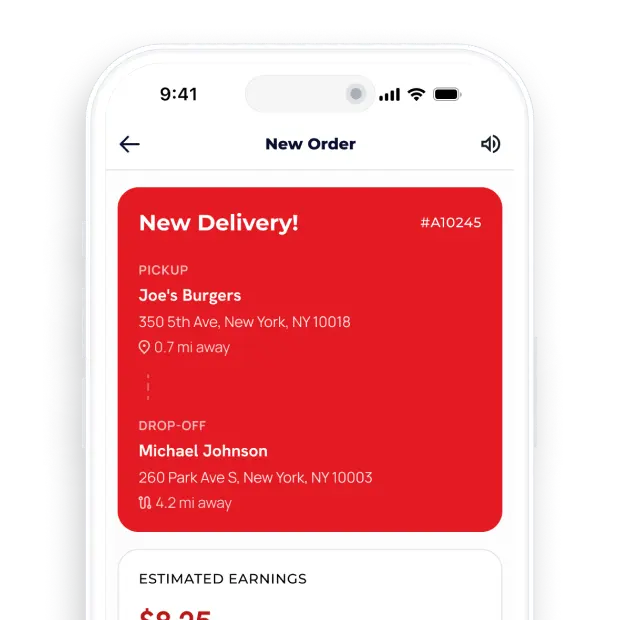
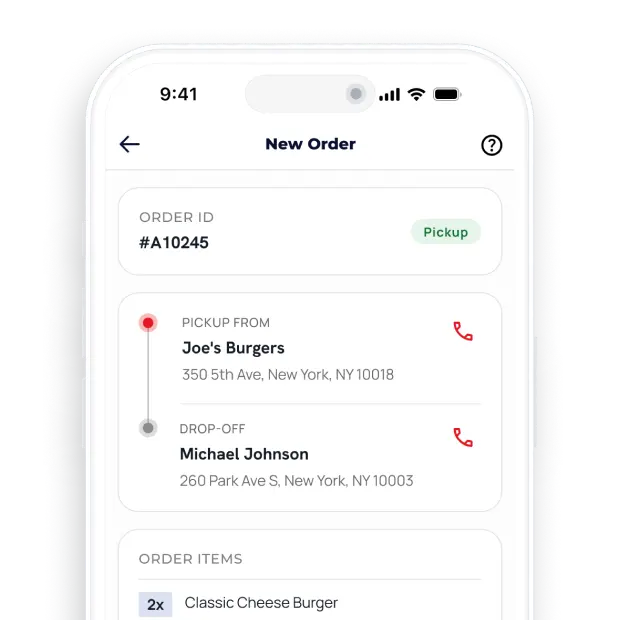
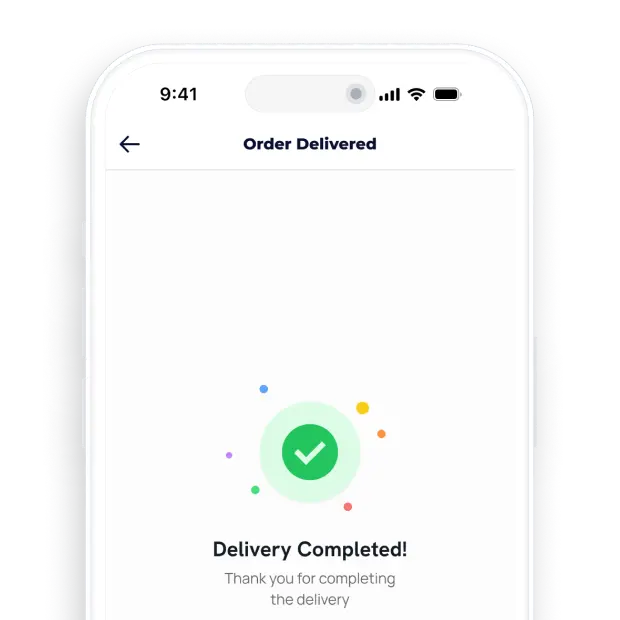
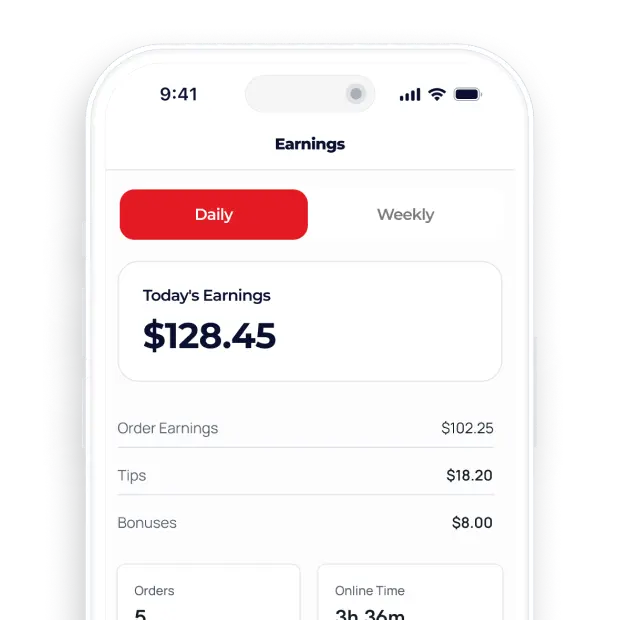
A driver’s shift, job by job
Drivers in a marketplace collect from a restaurant, then a grocer, then a florist. The app keeps every pickup and drop in order.
Start of shift
- Go online with one switch
- Receive jobs only in assigned zones
- Sound alert and timer for each job
- See the store’s ready time before leaving
On every job
- Several orders batched in one trip
- Turn-by-turn directions to store and door
- Chat with the store or the customer
- Status updates: picked up, on the way, delivered
At the door and after
- Proof of delivery by code, photo or signature
- Cash to collect shown on cash orders
- Earnings and tips by day, week and month
- Customer rating after each drop
Auto-assignment or manual dispatch?
You do not have to choose once. Dispatch by hand while the fleet is small, then switch on auto-assignment for busy hours.
| Auto-assignment | Manual dispatch | |
|---|---|---|
| Who picks the driver | The system picks a nearby free driver | Your dispatcher, in the admin panel |
| Works well for | Peak hours and many zones | A small fleet or a new zone |
| No reply from the driver | The job moves to the next driver | Your team picks someone else |
| Changing your mind | Any order can move to another driver at any time. | |
Not enough drivers in one area? Switch that delivery zone off for a while, or hand orders to a third-party delivery partner.
Fleet management from the admin panel
The driver app reports to your admin panel in real time. Proof of delivery is saved with each order, so a “never arrived” complaint takes one look to settle.
- 1
Add a driver
Create the account and assign the delivery zones they cover. They download the app and log in.
- 2
Watch the live map
See who is online, busy or offline, and where each order is right now.
- 3
Settle the cash
See the cash-on-delivery money each driver holds and mark it as handed in.
- 4
Pay the fleet
Use earnings and payout reports to pay drivers on your own schedule.
Free driver app or one under your name
Both versions work the same way. The only difference is the name drivers see on their phone and in the store listing.
Deonde-branded driver app
Drivers download the Deonde driver app and log in to your marketplace. Nothing to publish, nothing to pay.
Your-brand driver app
Your name, logo and colors on the App Store and Google Play. Useful when you recruit drivers under your own brand. Our team builds it and handles the store submission.
Delivery driver app: FAQs
What is delivery driver app software?
It is the app your drivers use to receive jobs, find the store and the customer, confirm each drop-off and check what they have earned. It connects to your admin panel, where you see every driver on a map and send or move orders.
How are orders assigned to drivers?
Either automatically, to a free driver nearby, or by hand from the admin panel. You can mix both and move an order to another driver at any time.
Can one driver carry several orders?
Yes. A driver can take several orders in one trip, for example two orders from the same restaurant, or a meal and a grocery order going the same way.
How does a driver prove an order was delivered?
With a one-time code from the customer, a photo at the door or the customer’s signature. The proof is saved with the order, so you can settle any “it never arrived” claim.
Does the driver app handle cash on delivery?
Yes. The app shows the driver how much cash to collect. You see the cash each driver holds in the admin panel and settle it with them.
Is the driver app free?
The Deonde-branded driver app is free on every plan. A driver app under your own brand is a one-time setup fee of $499, available on Premium and Growth.
Can the same drivers deliver food, groceries and parcels?
Yes. The same drivers can deliver from restaurants, grocery stores and any other store on your marketplace. Each job shows what to pick up and where to take it.
Where can I download the Deonde driver app?
The free Deonde-branded driver app is on the App Store and Google Play, listed as “Deonde - Driver”, for iOS and Android. Drivers log in with the account you create for them in your admin panel.
More of the Deonde platform
Let’s build the delivery app your customers will open every day.
In a free 30-minute demo we show you the real apps, explain the costs and sketch a launch plan for your market.
Free · No commitment · Your launch plan included