
Do you know that as of mid-2025, Blinkit holds over 50% of the market share in its sector, delivering millions of orders with an average delivery time of just 10 minutes?
Surprised? You shouldn’t be. Over the last few years, Blinkit has revolutionized on-demand grocery delivery by mastering one thing: technology.
Blinkit’s true genius lies in its technology: a perfectly synchronized app ecosystem that makes a complex logistical operation feel simple and magical for the customer.
The secret to Blinkit’s success is its seamless and highly accessible grocery delivery app. The app is a smart, tech-driven move that has helped the brand build a loyal fan base and attract new business by delivering on the promise of “groceries in minutes.”
But how is this possible? What does it take to build an app that can manage real-time inventory, route drivers, and process orders in seconds? If you’re an entrepreneur, a new grocery delivery startup, or an established enterprise looking to enter this high-growth market, what’s the blueprint?
Most startups fail by choosing the wrong path process at the wrong time. This guide will give you the practical, realistic answers you need.
So, how can you develop an on-demand grocery delivery app just like Blinkit? What features should you include, and how do you streamline the complex logistics for everyone involved?
Let’s find out.
What is Quick Commerce (Q-Commerce) Really?
Before we talk code, understand the model. Q-commerce is not just an e-commerce app with fast shipping.
It is a vertically integrated logistics business (meaning you control the entire supply chain, from the warehouse to the customer). The model relies on a network of strategically placed “dark stores” (small, local-only fulfillment centers) and a dedicated fleet of riders. The quick commerce app serves as the central nervous system, connecting the customer, the dark store picker, and the rider in a race against a 10 to 20-minute clock.
Do you know that the global quick commerce market is projected to reach over USD 323.91 billion by 2030?
If you don’t have the dark stores and riders, you don’t have a q-commerce business—you just have a fantasy.
It’s also important to distinguish this from a multi-vendor grocery app, where you act as an aggregator for existing supermarkets. The Blinkit model is vertically integrated, meaning you control the entire process from your own dark stores.
Why Develop an App like Blinkit?
It’s clear that consumer habits have shifted. The weekly grocery run is being replaced by on-demand, instant gratification. We’ve moved from “I’ll get it tomorrow” to “I need it now,” and an instant delivery app is the tool that meets this demand.
A quick commerce app like Blinkit taps directly into this new reality.
For a business, this model is a powerful tool. It’s not just another sales channel; it’s a way to build extreme customer loyalty and high-frequency usage. An app that can reliably deliver items in minutes becomes an indispensable part of a user’s daily life.
Given these changing habits, an on-demand q-commerce app presents a massive global opportunity for entrepreneurs and established retailers to capture a new, high-value market.
This value is driven by high-frequency usage; for instance, users who rely on Q-Commerce may order 4-6 times per week, compared to traditional e-grocery users who order 1-2 times.
Essential Features of a Grocery Delivery App like Blinkit
In this section, we’ll break down the essential features of a successful app like Blinkit. Your app’s features directly influence its design, technology, and development cost.
A Blinkit-like system is not just one app; it’s a powerful, interconnected ecosystem. For entrepreneurs, we recommend starting with the core features for ordering, payment, and delivery, and then adding more as your grocery delivery business grows.
Below, you’ll find a set of standard features for this on-demand app ecosystem:
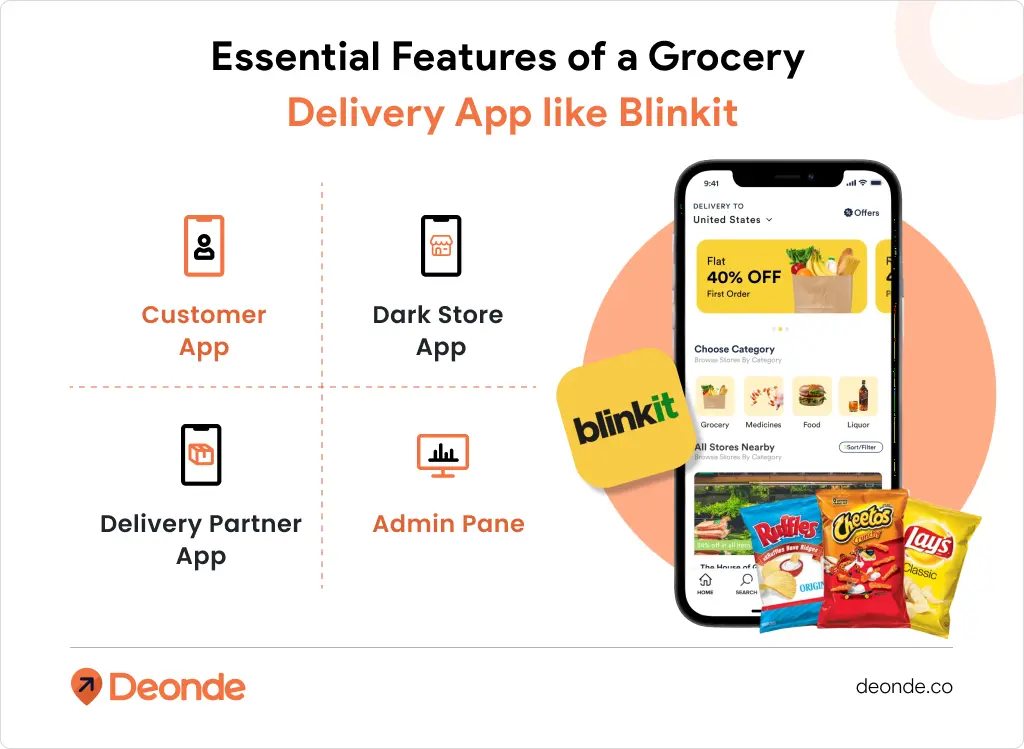
1. The Customer App (Your Digital Storefront)
The customer app is the only part your customer sees. It must be fast, intuitive, and, above all, reliable.
- Login & Signup: A seamless process using a phone number (with OTP) or social logins.
- User Profile & Address Management: Allows users to save multiple addresses (e’s, “Home,” “Work”) and payment details.
- Real-Time Product Search: A predictive, high-speed search bar is essential. No one will wait 5 seconds for results.
- Product & Category Pages: Clear, high-quality images, detailed descriptions, and visible pricing.
- Live Inventory: Customers must trust that what they see is in stock. This requires a real-time link to your dark store’s inventory.
- Promotions & Offers: A dedicated section to display discounts, BOGO (Buy One Get One) deals, and loyalty programs.
- Real-Time Order Tracking: A live map showing the delivery partner’s location and an accurate, constantly updated ETA. This is a non-negotiable feature for trust.
- Secure Payment Module: Integration with all major global and local payment gateways (credit/debit cards, digital wallets like Apple/Google Pay, etc.).
- Ratings & Reviews: Allows users to rate products and the delivery experience, providing crucial feedback.
- In-App Support/Chatbot: An instant way for users to resolve issues with their order.
2. The Dark Store App (For “Pickers & Packers”)
This is the app used by your staff inside the micro-fulfillment center (dark store). Speed here is critical.
- Order Ticking: As soon as an order is placed, it appears on this app in real-time.
- Optimized Picking Route: The app lists the items not in alphabetical order, but in the order they are physically located in the store to create the fastest picking path.
- Barcode Scanner: Staff scan items as they pick to ensure 100% accuracy and update the inventory.
- Order Handover: A final “Packaged & Ready” button that notifies the system to assign a delivery partner.
3. The Delivery Partner App (The Logistics Core)
This app is for your gig-economy riders. It must be simple, clear, and reliable.
- Login/Signup & Profile: For driver verification, document upload, and bank details.
- Order Acceptance: A clear “Accept/Decline” screen for new delivery assignments.
- In-App GPS & Route Optimization: Integrates with Google Maps or Mapbox to provide the fastest route from the dark store to the customer.
- In-App Communication: Allows the driver to safely call or message the customer (with number masking) and the support team.
- Earnings Tracker: A transparent dashboard showing daily/weekly earnings, tips, and delivery history.
- Proof of Delivery: A simple function to mark the order as “Delivered” (e.g., taking a photo, customer signature).
4. The Admin Panel (Your Mission Control)
This is the powerful web-based dashboard where your management team runs the entire operation.
- Master Inventory Management: The most important feature. Allows you to add/edit products, track stock levels across all dark stores, and manage pricing.
- Order Management: A real-time overview of all incoming, processing, and completed orders.
- Refund & Dispute Management: A streamlined process for handling customer complaints and processing refunds quickly to maintain high satisfaction.
- User & Driver Management: A central database to manage customer accounts, support tickets, and your entire delivery fleet.
- Location Management & Geofencing: Define your delivery zones and manage your network of dark stores.
- Promotions & Marketing: A tool to create and push new discount codes, banners, and loyalty campaigns.
- Analytics & Business Intelligence: A dashboard with KPIs on sales, delivery times, popular items, and driver performance to make data-driven decisions.
How to Create a Quick Commerce App like Blinkit
Let’s walk through the steps needed to develop a grocery app just like Blinkit:
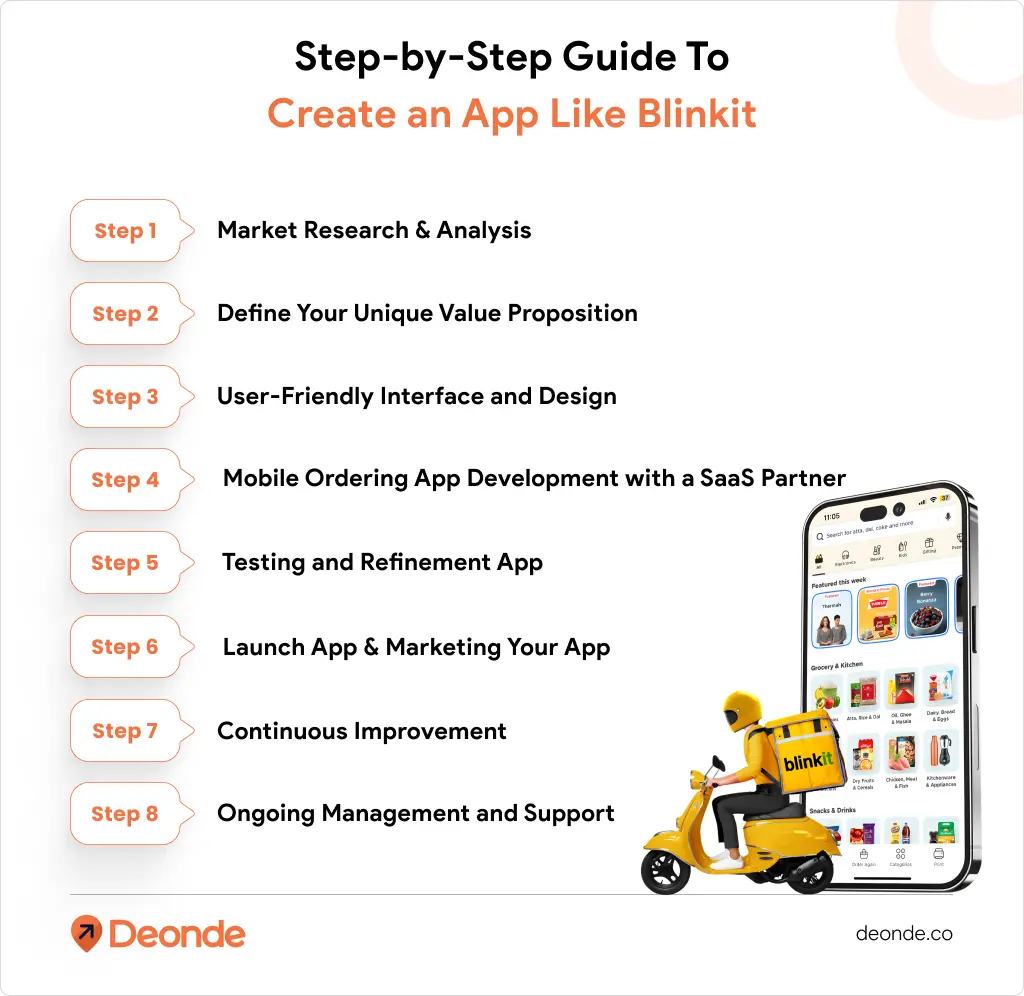
Step 1: Market Research & Analysis
The crucial first step is to research your target audience and the existing market. Analyze customer preferences and dissect competitor apps (like Blinkit or Zepto) to identify their strengths and weaknesses.
Most importantly, your research must answer a key strategic question: Which Q-Commerce business model aligns best with your starting capital? Will you follow the inventory-led, dark-store model (like Blinkit) or a marketplace/aggregator model? This decision, driven by your budget, will define your entire operation.
Step 2: Define Your Unique Value Proposition (UVP)
Create a detailed list of features, prioritizing based on user needs and your UVP. The 10-minute model is the core feature, but you could also differentiate with a niche (e.g., organic-only, imported snacks) or a unique loyalty program.
Step 3: User-Friendly Interface and Design
Design an intuitive and visually appealing app interface. For a Blinkit-style app, speed is everything. The user must be able to open the app, find an item, and check out in under a minute. Focus on ease of navigation and clear calls-to-action.
Step 4: Mobile Ordering App Development with a SaaS Partner
Without a technology partner, you’ll have to build a team and oversee the 6-12 month development of your complex, 3-part mobile app ecosystem.
But thanks to Specialized White-Label Quick Commerce Solutions, you simply need to sign up, customize, and begin selling! With a ready-made solution, you can have your customized grocery delivery app live in less than a few weeks. And the best part? You can scale up or down as you go.
Here’s how a white-label partner simplifies development:
- Branding: You upload your logo, choose your brand colors, and customize the app’s look and feel to match your identity.
- Menu & Inventory Integration: You add your product catalog, including categories, descriptions, prices, and any special offers.
- Location Setup: You define your service areas and delivery zones using powerful geofencing tools.
- Payment Gateway Integration: Connect your preferred payment gateways to accept online orders.
Step 5: Testing and Refinement App
Once your customized app is ready for deployment, your technology partner’s team will thoroughly test it to ensure everything works smoothly. They will double-check the ordering workflows, payment integration, and (most importantly) the live tracking features.
Step 6: Launch App & Marketing Your App
Once you’re satisfied, your partner will assist with the launch and deployment process, publishing your apps on the app stores (iOS and Android).
Now that you have an app ready, prepare an extensive hyperlocal marketing strategy. You don’t launch nationally; you launch one neighborhood at a time. Use targeted social media ads, local flyers, and collaborations to attract your first customers.
Step 7: Continuous Improvement
Regularly gather user feedback and monitor your admin panel’s analytics. This will help you identify areas for improvement. To stay ahead, you must update your app with new features and adapt to changing customer preferences.
Step 8: Ongoing Management and Support
With a SaaS partner, you receive ongoing support and regular app maintenance—so you don’t have to worry. Your partner handles all app updates, server maintenance, and technical issues, allowing you to focus on your core business: managing inventory and delivering to customers.
A Better, Faster, & Economical Way to Develop Your Grocery App
Building a custom app from scratch is a massive undertaking, filled with technical risks, high costs, and long timelines.
For most entrepreneurs and businesses, a specialized SaaS (Software-as-Service) provider (or white label grocery app) is the superior choice.
Here’s why you should consider a white-label solution:
- Speed to Market: Launch your branded app in weeks, not years. This allows you to capture the market opportunity now before it’s saturated.
- Massive Cost Savings: Avoid the six-figure upfront development cost. Instead, you pay a one-time setup fee and a predictable monthly subscription.
- Focus on Your Business: Let the tech partner handle the code, servers, updates, and bug fixes. You can focus on your real job: sourcing great products, managing your stores, and marketing to your customers.
- Instant Access to Pro Features: Get all the complex features (live tracking, inventory management, route optimization) from day one—features that would cost hundreds of thousands to build yourself.
Conclusion
Developing a grocery delivery app like Blinkit requires careful planning, attention to detail, and a focus on delivering a high-speed, reliable user experience.
By conducting thorough research, defining your unique value proposition, and designing a user-friendly app, you are on the right path. While these steps bring you closer to the success of established brands like Blinkit, sustained growth requires ongoing effort.
Continuously adapting and improving your app based on user feedback and evolving market trends is crucial for long-term viability in the dynamic world of on-demand delivery.