
"Deonde's team was fantastic in creating our own ordering app. It's made a real difference in how we operate, and our customers are finding it so convenient. Highly recommend their service!"Read Chowman Case Study →
Customers scan a QR code at their table, browse your live menu, place their order, and pay — all without calling a waiter. Faster service, higher spend per cover, and fewer errors.
Trusted by 300+ brands worldwide










Six features that eliminate order-taking bottlenecks, increase spend per cover, and give your team more time to focus on hospitality.
Each table gets a unique QR code. Customers scan it with their phone camera — no app download required — and your full menu opens instantly in their browser with live prices and availability.
Customers browse categories, select items, add modifiers and special requests, and place their order — all from the table QR menu. Orders go directly to the kitchen display with the table number.
Customers can pay at the table via the QR menu — cards, wallets, Apple Pay, or Google Pay. Alternatively, staff can bring a payment terminal for tableside card processing. Both workflows are supported.
Every table order appears instantly on the kitchen display with the table number and order time. Kitchen staff see all dine-in orders in sequence — no paper tickets, no miscommunication.
Manage your entire floor plan from the admin panel — table numbers, covers, and status. See which tables are occupied, ordering, waiting for the bill, or available — in real time.
The QR menu automatically suggests add-ons, upgrades, and complementary items at checkout. Upsell prompts for drinks, sides, and desserts consistently increase average spend per cover by 15–25%.
A waiter can only take one table's order at a time. With QR table ordering, every table orders simultaneously — the kitchen gets all orders instantly, and customers are served faster. Studies show dine-in QR ordering increases average spend per cover by 15–25% because customers browse the full menu at their own pace and order additional rounds more easily.
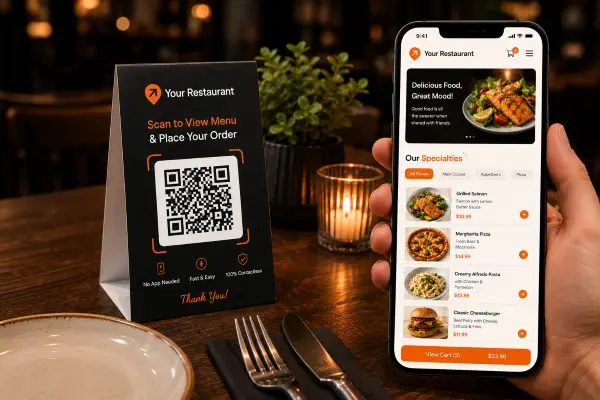
Configure your table numbers and floor plan in the admin panel. Print QR codes for each table — stick them to table stands, placemats, or tent cards. Setup takes under an hour.
Guests scan the table QR code with their phone camera. Your live menu opens in their browser — no app required. They add items, apply modifiers, and place their order or pay directly from the table.
Every table order appears on the kitchen display with the table number and order sequence. Staff prepare in order. When ready, the waiter delivers — or the customer sees a "ready" notification to collect.
See what our customers say about transforming their delivery business
"Deonde's team was fantastic in creating our own ordering app. It's made a real difference in how we operate, and our customers are finding it so convenient. Highly recommend their service!"Read Chowman Case Study →
"Starting our own delivery app felt overwhelming before Deonde. But they made it incredibly simple. We launched in less than a week, and our sales have grown significantly since then."Read HungryJi Case Study →
"Deonde has completely transformed how we handle orders. The admin panel gives us full control, and our customers love the smooth ordering experience. Best investment we've made."Read Munch Zimbabwe Case Study →
Everything you need to run a world-class delivery operation, included from day one
Intuitive dashboards your team can master in hours. No technical expertise required to get started.
Bank-level encryption, GDPR compliance, and monitored cloud hosting, with custom SLAs available for enterprise plans. Your data and your customers' data stays safe.
Zero commissions means every order goes directly to you. Most businesses recover their investment within the first month.
Dedicated onboarding team and 24/7 technical support. We're with you from setup to scale.
New features shipped every month. No extra cost, no downtime. Your platform evolves with market demands.
Manage your business from any device, anywhere. Full-featured web dashboard plus native mobile apps.
Explore why a Table Booking System for Restaurants is important for efficient reservations and improved guest experiences.
If you want to develop a Restaurant Reservation System for your restaurant business, we are here to help you with this task.
DeOnDe offers readymade restaurant solutions on monthly rental, which proves quite efficient as well as affordable. The features and benefits along with the...
This feature is part of Deonde's complete commission-free restaurant ordering platform — branded app, website, driver management, QR menus, and multi-location support. Used by restaurants across 24+ countries.